
About
Plug in your capture card and the feed goes fullscreen. No OBS, no dashboard, nothing between you and the picture.
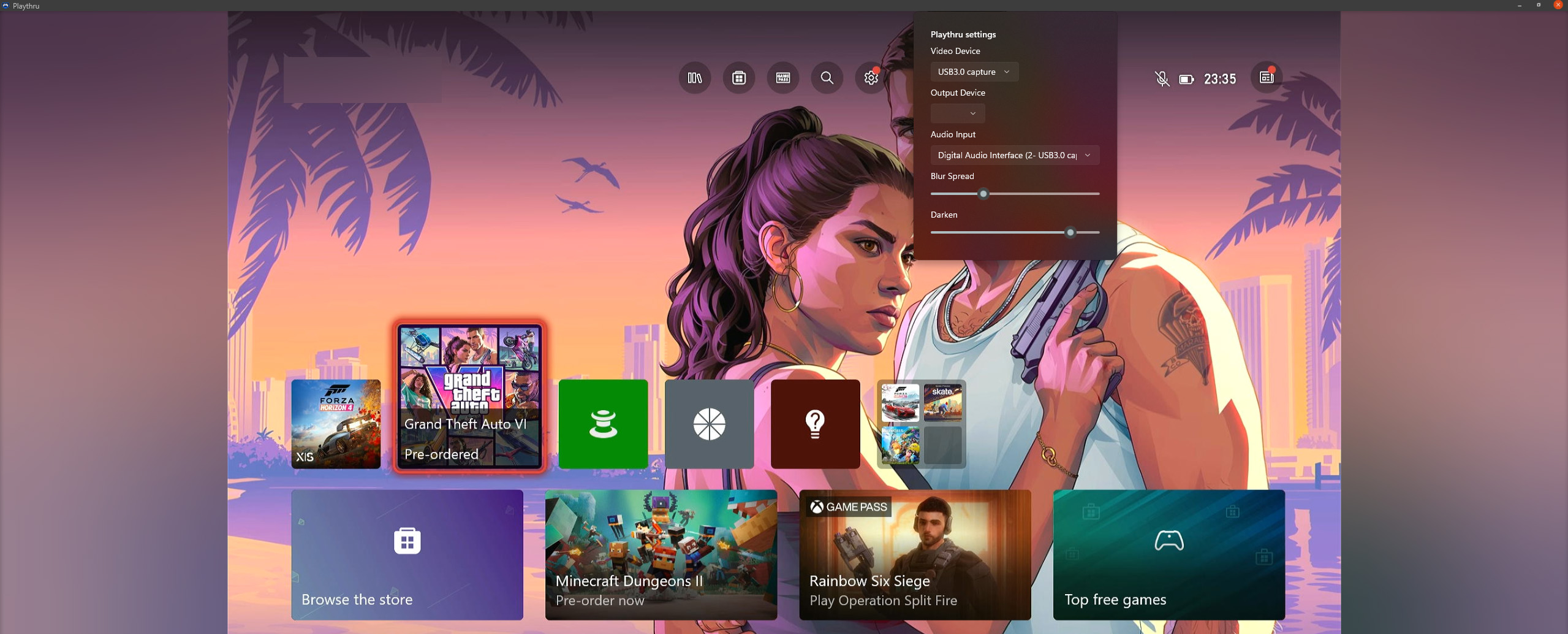
The sharp frame stays in the middle, and the empty sides of an ultrawide fill with a blurred copy of the same feed. Setup is three steps. Two of them are picking a thing from a list.
The problem
16:9 video on an ultrawide screen
A cheap card sends 16:9, and on an ultrawide that leaves two big black pillars. OBS handles it, but it's a recording studio for one job. The viewers that ship with the cards are usually worse.
The fix
Use the picture itself as the background
The same frame gets downscaled, blurred, and darkened behind the sharp feed, so the sides follow the game in real time instead of sitting black. The background renders from a tiny copy of the frame, so it costs almost nothing.
Playthru 2.3 current
Controls
Mouse to the edge, or a key
- Escape or F11Fullscreen on and off. Covers the taskbar, alt-tab still works.
- Move the mouse rightSettings panel slides out, five tabs. The video keeps playing behind it so you can see what a slider does.
- SlidersColour grade, blur, sharpen, denoise and saturation for the picture, all ported over from the C++ version. Delay and buffer for the sound.
- Stats for nerdsIts own tab. Resolution, pixel format, fps, what the audio's doing, what your display can't show. Look here first when something seems off.
- F12Saves a snapshot of the picture into your Pictures folder.
- MMute and unmute. Real mute, not just volume at 0.
- [ and ]Volume down and up.
- ArrowsMove around while zoomed in.
- 0Zoom back out to the whole picture.
- Ctrl+Alt+Shift+QForce quit from anywhere, even when the UI's frozen.
Under the hood
- BuildPython, packed into one .exe. Nothing to install first, no runtime to go and find.
- InstallerA normal Windows installer that sets it up like any other app, and what it installs is that one .exe. It also spots the old C++ version and offers to delete it, since the two can't share the capture card.
- Videompv draws the picture, in the same process, inside a window Playthru owns. Twenty years of other people being good at presentation, and it was smooth on the first try with the card that stuttered three hand-written renderers.
- UltrawideThe sides get a blurred, darkened copy of the frame instead of black bars. It's made from a tiny copy, so it costs basically nothing. Ported over from the C++ version.
- AudioSound goes straight from the card to the sound device on its own path, not tied to the picture. mpv doesn't touch it, the output is Playthru's own WASAPI code. Delay and buffer are yours to set. It fades in when the picture starts.
- SyncThe sound device is opened at the speed it actually runs at, and converting from the card's speed is done here rather than by Windows. The two never match exactly, so it reads a hair fast or slow and drifts back rather than dropping or repeating anything.
- InterfaceThe panel is a web page with no window of its own, pushed over the picture. That's how it gets tabs, sliders and a stats readout without hand drawing any controls, and why dragging a slider can't stutter the video.
- FullscreenCovers the whole display, taskbar too. No sliver at the bottom and no dragging the window halfway across the screen by accident. Alt-tab works.
- Before 2.1Playthru used to draw its own picture. Three hand written renderers, all of them stuttered. 2.1 just hands the picture to mpv, which is why there's a Python version at all and why the C++ one is done.
- Known problemsSound pops on some machines. Looks like drivers, since other apps pop there too. If it crackles, that's almost always the CPU, because mpv isn't smoothing anything on the audio side. The first couple seconds of bass can sound like a dying fridge while the card and the sound device settle on a speed, then it's fine.
- SettingsOne JSON file at
%LOCALAPPDATA%\Playthru2\settings.json. It reads the old version's settings once and copies them over. Delete it and everything resets.
Playthru 0.35 deprecated
Controls
Two clicks and a key
- F11Fullscreen. Same key everyone else uses.
- Double left clickPicture, sound, and cleanup filters in one tabbed panel. The feed keeps playing next to it.
- Right clickSettings, back to the intro, and a debug submenu. A native menu, so it opens over the video while the video keeps running.
- Update noticeAppears at the top of the video when a newer build is up. Click it to download, click anywhere else to put it away.
- Idle pointerAfter three still seconds the mouse hides itself and comes back the moment you move it. Three seconds is a setting, not a law.
- Stats for nerdsLive resolution, pixel format, FPS, and every effect value, toggled from the debug menu.
- Ctrl+Alt+Shift+QForce quits the app. For when the UI locks up and you just want out.
Under the hood
- AudioNAudio passes the input straight through, about 50ms of latency. Output switching uses the Windows
IPolicyConfigCOM interface, because there's no public API for changing the default device. - VideoThe card's raw YUV goes through the GPU video processor, which does the colour conversion, the scaling, and the blurred background for the sides of an ultrawide in one pass. The picture filters are custom pixel shaders over the finished frame: an edge aware denoise that averages the neighbours that match and leaves the ones that differ alone, an edge anti aliasing pass, and the colour grade, which works in linear light as lift / gamma / gain.
- RendererOne window, and the video is a Win32 child window inside it with a flip model swap chain the app owns. A finished frame goes to the compositor as soon as it is drawn, and the picture is the same one the video processor just wrote.
- Before 0.025Every build up to 0.024 drew the feed into a XAML
SwapChainPanel. That makes it a composition swap chain, so each frame was handed to the XAML compositor and shown on the UI thread's composition tick. A late tick meant the frame waited a refresh, andPresentblocked while both buffers were held, which is where the last few dropped frames per second came from. 0.025 keeps the same window and the same engine and takes the UI thread out of the path between a finished frame and the screen. - BuildWindows App SDK (WinUI 3) on .NET 8, self-contained so it carries its own runtime. This is the older build, and this is the last version of it.
- SettingsStored in one JSON file at
%LOCALAPPDATA%\Playthru\settings.json, written by the app itself. Playthru 2.1 reads this file the first time it runs and copies what it recognises into its own.
Files
Playthru 2.3
The current version. Still being worked on.
Playthru2-Setup-2.3.exe
Windows installer. The picture no longer stutters, the sound plays at whatever speed your device runs at, and the side menu comes up over everything
Download
source_code_23_python.zip
Everything needed to run it, open source
Older versions
Playthru2-Setup-2.2.exe
Windows installer. The sound plays at whatever speed your device runs at, and the update check tells you when there is a new one
Download
source_code_22_python.zip
Everything needed to run it, open source
Playthru2-Setup-2.1.exe
Windows installer. The build that handed the picture to mpv and stopped the stutter
Download
source_code_21_python.zip
Everything needed to run it, open source
Playthru 0.35 and older
The older C++ version. No longer updated.
Older versions
PlaythruSetup-0.35.exe
Windows installer. The volume keys, the volume on the picture, and the display picker fixed
Download
source_code_0.35.zip
Complete VS Code project, open source
PlaythruSetup-0.34.exe
Windows installer. Format picker, 3D lookup table, and the panel rebuilt around five tabs
Download
source_code_0.34.zip
Complete VS Code project, open source
PlaythruSetup-0.33.exe
Windows installer. The picture fixing itself instead of needing a restart
Download
source_code_0.33.zip
Complete VS Code project, open source
PlaythruSetup-0.32.exe
Windows installer. The moving backdrop behind the menu and the settings panel, and the close button exiting straight out
Download
source_code_0.32.zip
Complete VS Code project, open source
PlaythruSetup-0.31.exe
Windows installer. The settings panel transition, the digital rain, and the picture moving aside for it
Download
source_code_0.31.zip
Complete VS Code project, open source
PlaythruSetup-0.30.exe
Windows installer. The picture filters, the colour grade, presets, and the freeze fixed
Download
source_code_0.30.zip
Complete VS Code project, open source
PlaythruSetup-0.025a-release-candidate.exebroken
Windows installer, release candidate. Fixed the crashes 0.025 beta shipped with, but the freeze came back, and 0.30 is the build that found it
Download
source_code_0.025a_release_candidate.zip
Complete VS Code project, open source (release candidate)
PlaythruSetup-0.025-beta.exebroken
Windows installer, beta build. Freezes and crashes, get the newest build at the top of this page instead
Download
source_code_beta_25.zip
Complete VS Code project, open source (beta)
PlaythruSetup-0.024-beta.exe
Windows installer, beta build
Download
source_code_beta_24.zip
Complete VS Code project, open source (beta)
Source
PlaythruSetup-0.023b-beta.exe
Windows installer, beta build
Download
source_code_beta_23b.zip
Complete VS Code project, open source (beta)
Source
PlaythruSetup-0.023-beta.exe
Windows installer, beta build
Download
source_code_beta_23.zip
Complete VS Code project, open source (beta)
Source
PlaythruSetup-0.022-beta.exe
Windows installer, beta build
Download
source_code_beta_22.zip
Complete VS Code project, open source (beta)
Source
PlaythruSetup-0.021-beta.exe
Windows installer, beta build
Download
source_code_beta_21.zip
Complete VS Code project, open source (beta)
Source
PlaythruSetup-0.020-beta.exe
Windows installer, beta build
Download
source_code_beta_20.zip
Complete VS Code project, open source (beta)
Source
PlaythruSetup-0.019-beta.exe
Windows installer, beta build
Download
source_code_beta_19.zip
Complete VS Code project, open source (beta)
Source
PlaythruSetup-0.018-beta.exe
Windows installer, beta build
Download
source_code_beta_18.zip
Complete VS Code project, open source (beta)
Source
PlaythruSetup-0.017-beta.exe
Windows installer, beta build
Download
source_code_beta_17.zip
Complete VS Code project, open source (beta)
Source
PlaythruSetup-0.016-beta.exe
Windows installer, beta build
Download
source_code_beta.zip
Complete VS Code project, open source (beta)
Source
PlaythruSetup-0.015-alpha.exe
Windows installer, alpha build
Download
source_code_alpha.zip
Complete VS Code project, open source (alpha)
Source
PlaythruSetup-0.014.exe
Windows installer
Download
source_code.zip
Complete VS Code project, open source
Source